Screenless still means checking the app
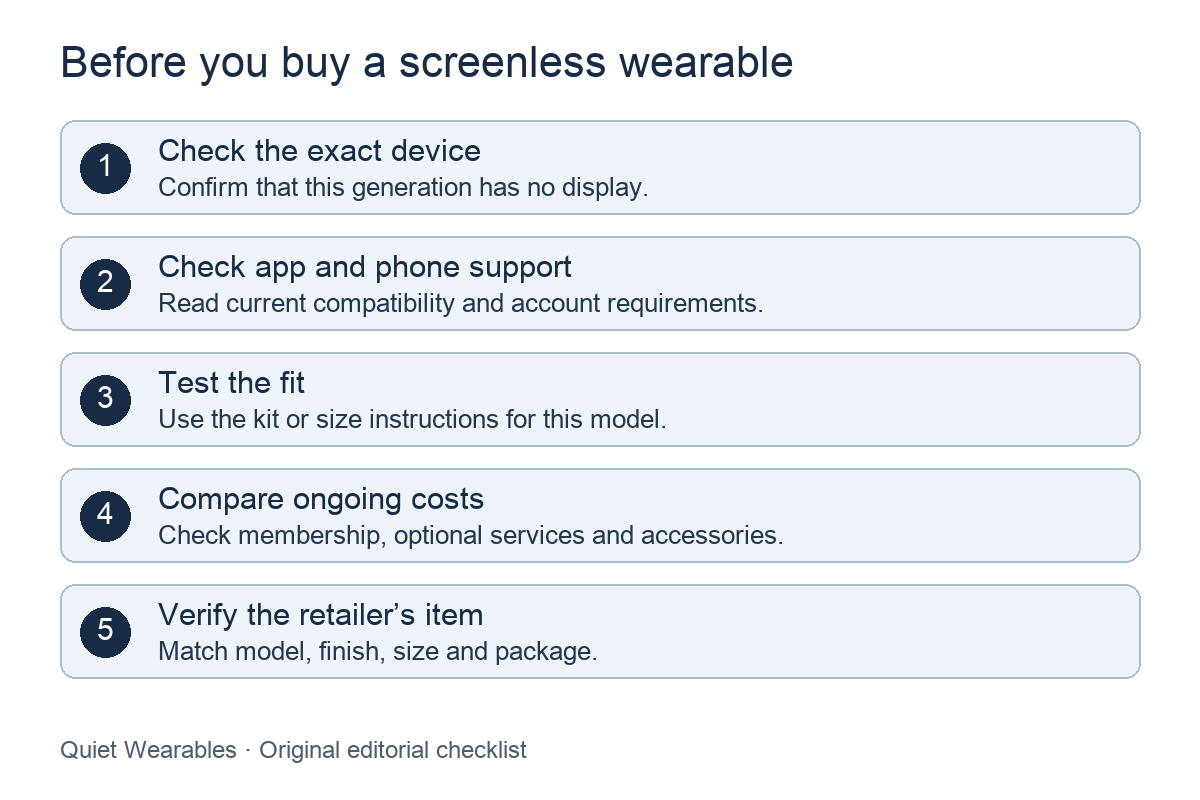
The absence of a device display describes its interface. It does not tell you whether you need a phone, an account or an internet connection. Read the exact model’s setup instructions before assuming it works on its own.
Oura Ring 4, for example, pairs with the Oura App. Ultrahuman Ring AIR also uses its maker’s app. These are examples of app-connected rings, not a promise that every ring or band has the same requirements.
Sources: Oura Ring 4: app and model-specific sizing; Oura App setup and phone requirements; Ultrahuman Ring AIR product information and FAQ.
Choose a form you can wear
Start with where you want to wear a device: on a finger or around a wrist. Consider your work, exercise and usual jewelry. Check the manufacturer’s restrictions for activities where you plan to wear it, along with its charging instructions.
A ring shape does not establish comfort, sleep accuracy or a better recovery score. A wristband is not automatically screenless. Check the exact generation for a display and the features you need. For this site, a hidden or small device screen still counts as a screen.
Decide which information you will use
Write down what you want to review in the app. Then read the manufacturer’s explanation of each metric: what the device measures, what the app calculates and what information is available to you.
Look for evidence relevant to the exact model, metric and intended use. A feature list or a manufacturer’s accuracy claim does not establish an independent comparison. General wellness guidance also does not approve an individual ring for diagnosis or treatment.
Sources: FDA general wellness guidance for low-risk devices.
Check your phone before ordering
Compare your phone and operating system with the current app requirements. Check any requirements for an app store, Bluetooth or account setup. Use the current manufacturer instructions, because supported versions can change.
Oura’s setup page lists its current phone and Bluetooth requirements. Ultrahuman’s product page links its app and compatibility information. Check the requirements for your region and the app you will actually install.
Sources: Oura App setup and phone requirements; Ultrahuman Ring AIR product information and FAQ.
Test fit and plan for charging
For a smart ring, use the sizing kit for that exact model. Oura states that sizing differs between generations. A familiar jewelry size or another manufacturer’s size number is not enough to select a ring.
Follow the manufacturer’s full trial and fit checks. Our reviewed sizing guide compares the instructions for Oura Ring 4 and Ultrahuman Ring AIR. For a band, check the stated size range and fitting instructions. Before ordering either form, confirm the included charger and any replacement accessories you would need.
Sources: Oura Ring 4: app and model-specific sizing; Ultrahuman Ring AIR product information and FAQ.
Compare the costs of the features you want
Check the hardware price, membership terms and any optional services before comparing totals. Find out what remains available if you stop paying, and check current regional terms before relying on a trial or promotion.
Oura’s membership guidance describes the app features available with and without membership. Ultrahuman’s Ring AIR FAQ says there is no recurring subscription for accessing ring data. That statement covers ring-data access; it does not establish that every optional service or accessory is included.
Sources: Oura membership, data access and cancellation; Ultrahuman Ring AIR product information and FAQ.
Review data controls before connecting services
Read the manufacturer’s privacy policy and find its export, account-deletion and integration controls. Decide which connections you want to enable before sharing data with another app.
Oura says canceling membership does not by itself delete your account or stored data. Its privacy guidance also says data already shared with a third party must be managed separately. Ultrahuman’s policy describes access, deletion and portable-copy requests, including retention limits and exceptions. These documented options are not a security audit or a guarantee that every copy disappears immediately.
Sources: Oura membership, data access and cancellation; Oura data and account controls; Ultrahuman privacy policy.
Confirm the exact item at the retailer
Compare the model name and generation, finish, size, connectivity version and package contents with the item you intend to buy. Confirm compatibility, current price and return terms on the retailer page. A similar photograph or a matching brand name does not establish that it is the same item.
Use our catalog to compare screenless models, then check the retailer’s exact item. Read the model-specific sizing guide before selecting a ring size.